---
title: How to provision, install, configure and keep thousands of Debian and Debian-based systems updated
date: 2026-07-21
author: Osiris Alejandro Gomez (OSiUX) osiux@osiux.com
og_title: How to provision, install, configure and keep thousands of Debian and Debian-based systems updated
og_description: Transcript of the talk
og_type: article
og_url: https://osiux.com/2026-07-21-debconf26-how-to-provision-install-configure-and-keep-thousands-of-debian-and-debian-based-systems-updated.html
og_site_name: OSiUX
og_locale: es_AR
og_image: https://osiux.com/videos/debconf26-265-como-aprovisionar-instalar-configurar-y-mantener-actualizados-miles-de-sistemas-debian-y-basados-en-debian.av1.png
---
- [index](index.md)
- [about](about.md)
- [archive](archive.md)
- [charlas](charlas.md)
- [docs](docs.md)
- [links](links.md)
- [dot](dot.md)
- [git](git.md)
- [img](img.md)
- [plt](plt.md)
- [tty](tty.md)
- [uml](uml.md)
## Summary
This project manages around `3,000` *Debian* servers and `3,000` *Debian-Based* workstations across `300` branches.
This is a real-world case study of how to provision, install, configure and maintain thousands of Debian and Debian-based systems using Free Software.
The infrastructure combines *Ansible*, *AWX*, *Proxmox*, *PXE*, *FreeIPA*, *GitLab* `CI/CD` and several caching layers to automate the deployment and maintenance of approximately `6,300` systems across hundreds of branches.
The project started in 2018 and evolved continuously as the infrastructure, hardware, security requirements and software stack changed.
## Talk
```{=html}
```
- Demo Site: [](https://filiales-gnu-linux.g.coop.ar/)
- Original Video: [`WebM (298 MB)`](https://meetings-archive.debian.net/pub/debian-meetings/2026/DebConf26/debconf26-265-como-aprovisionar-instalar-configurar-y-mantener-actualizados-miles-de-sistemas-debian-y-basados-en-debian.av1.webm)
- Subtitle Video: [`WebM (298 MB)`](https://filiales-gnu-linux.g.coop.ar/videos/debconf26-265-como-aprovisionar-instalar-configurar-y-mantener-actualizados-miles-de-sistemas-debian-y-basados-en-debian.av1.webm)
- Spanish Subtitle: [`SRT (50 KB)`](../videos/debconf26-265-como-aprovisionar-instalar-configurar-y-mantener-actualizados-miles-de-sistemas-debian-y-basados-en-debian.av1-es.srt)
[`VTT (44 KB)`](../videos/debconf26-265-como-aprovisionar-instalar-configurar-y-mantener-actualizados-miles-de-sistemas-debian-y-basados-en-debian.av1-es.vtt)
- English Subtitle: [`SRT (48 KB)`](../videos/debconf26-265-como-aprovisionar-instalar-configurar-y-mantener-actualizados-miles-de-sistemas-debian-y-basados-en-debian.av1-en.srt)
[`VTT (42 KB)`](../videos/debconf26-265-como-aprovisionar-instalar-configurar-y-mantener-actualizados-miles-de-sistemas-debian-y-basados-en-debian.av1-en.vtt)
- English Slides: [`PDF (357 KB)`](2026-07-21-debconf26-how-to-provision-install-configure-and-keep-thousands-of-debian-and-debian-based-systems-updated.pdf)
- Spanish Slides: [`PDF (357 KB)`](2026-07-21-debconf26-como-aprovisionar-instalar-configurar-y-mantener-actualizados-miles-de-sistemas-debian-y-basados-en-debian.pdf)
Este *post* es una traducción al inglés, de la transcripción de la charla [Cómo aprovisionar, instalar, configurar y mantener actualizados miles de sistemas Debian y basados en Debian](2026-07-21-debconf26-como-aprovisionar-instalar-configurar-y-mantener-actualizados-miles-de-sistemas-debian-y-basados-en-debian.html)
## Topics
- *Debian*
- *Ansible*
- *AWX*
- *Proxmox*
- *PXE*
- *FreeIPA*
- *GitLab* `CI/CD`
- Infrastructure as Code
- `GNU/Linux` workstation management
- Automated deployment
## *DebConf26*
This year, attending my first `DebConf` [^1], the `DebConf26` [^2] in *Santa Fe*, I took the opportunity to give the talk `"How to Provision, Install, Configure, and Keep Thousands of Debian and Debian-Based Systems Updated"` as an update to the talk I presented at `nerdearla` [^3] edition 2022 which was
called `"How to Migrate 6300 Machines to GNU/Linux Using Ansible and AWX"` [^4]
## *gcoop*
```{=org}
#+ATTR_HTML: :width 640 :height 360 :title presentation with Ansible, gcoop and AWX logos
```
[](https://filiales-gnu-linux.g.coop.ar/)
My name is *OSiRiS*, and I am called `OSiUX` in the community. I work at `gcoop` [^5], which is a *Cooperative* of *Free* *Software*, meaning we exclusively work with `FreeSoftware` [^6] in a horizontal organization. We have no bosses, no employees.
Five members (partners) from *gcoop* attended the event; it is our first time at *DebConf*. We sponsored this event and give thanks to `Debian` [^7] because we have 20 years of working with *Free* *Software*, and without *Debian* it would not have been possible.
## Project Scope: Managing 6,300 Debian/Debian-Based Systems Since 2018
I will show an update to a previous talk I gave in `2022`, regarding the migration project of *Branches* /GNU/Linux of the `Credicoop Bank
Cooperative Limited` [^8], which is a cooperative bank.
And I will try to quickly review the migration process and then we will look at the differences in recent years. This project...
Basically, it is an *Infrastructure as Code* project using `Ansible`
## Lab for Project Feasibility using Free Software
```{=org}
#+ATTR_HTML: :width 640 :height 360 :title presentation of the project laboratory using free software, VPN logos, Proxmox, VMs with Debian, Workstations with Ubuntu, Ansible, GitLab and integration between FreeIPA with ActiveDirectory
```
[](file:img/debconf26/debconf26-filiales-gnu-linux-02-lab-tec.png)
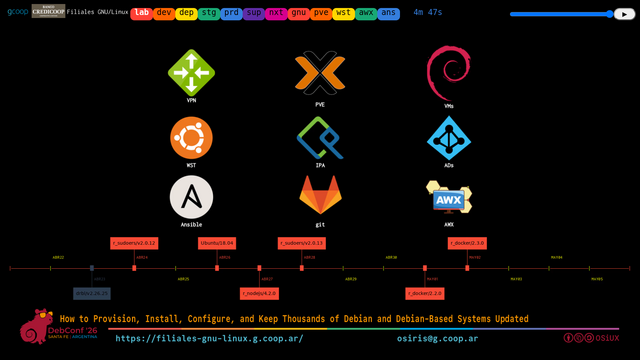
Well, at the beginning of the *project*, even though it took `6` months, we had to try to discover which tools from the *Free* *Libre* *Open* *Source* *Software* ecosystem would allow us to carry out the entire infrastructure migration of a bank across the length and breadth of Argentina.
What we found was that the automation tool was *Ansible* because we were already using it. We would use `GitLab` [^9]. For ActiveDirectory authentication within Linux, we would use *IPA*. For *AWX*, obviously all servers would run on `Proxmox` [^10]. We had been working with *Proxmox* for years. The *VMs* inside the *Proxmox*
servers would be *Debian*, obviously.
And for the *Workstations*, due to there being `3,000` of them and for *Support* reasons, we chose a distribution based on *Debian*. This... a little more updated.
What we have there, it doesn\'t show very well there, but what is moving is that... underneath are all the components; it\'s a timeline, all the dependency components we use, which are being updated worldwide, all the time. I mean, at that moment, in this month, a new versión of one component came out, and another, and another. And as you are
figuring out how to do things, the whole ecosystem is updating. So it\'s a problem to solve.
## Automated *Debian* and *Proxmox* Deployment with *PXE* and *AWX*
```{=org}
#+ATTR_HTML: :width 640 :height 360 :title Introducing automated deployment of Debian and Proxmox with PXE and AWX using GitLab as source of truth
```
[](file:img/debconf26/debconf26-filiales-gnu-linux-03-dev-dep.png)
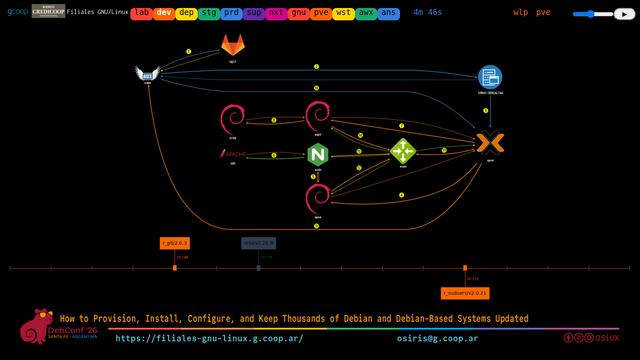
But well, what we reached was that in Development we managed to orchestrate a *deploy* idea, which is basically: we have an *AWX*, let me point it out like this, this is an *AWX*, and this *AWX\'s* source of truth is a *GitLab*. So, *AWX* reads from *GitLab* everything that would be... I mean, *playbooks*, and the first step is to *deploy* the
*iDRAC*.
```{=org}
#+ATTR_HTML: :width 640 :height 360 :title presentation with iDRAC website with storage RAID and VNC with boot DELL server
```
[](file:img/debconf26/debconf26-filiales-gnu-linux-03-dev-pve.png)
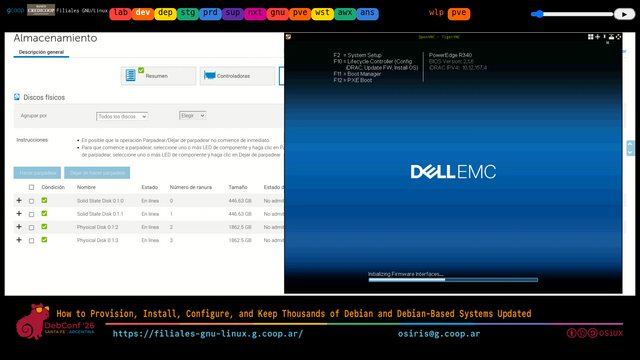
The `iDRAC` [^11] is the computer inside the computer. Inside the *Dell* servers we use, before the server even has anything, there is a small computer called *iDRAC*. Using a protocol called *Redfish*, we made *playbooks* that *AWX* connects to the *iDRAC* and does partition the disk, configure the *BIOS*, and `reboot` into
`PXE` [^12]. So, a brand-new computer fresh out of the box.
```{=org}
#+ATTR_HTML: :width 640 :height 360 :title presentation with debug of PXE boot to install Debian on Dell server
```
[](file:img/debconf26/debconf26-filiales-gnu-linux-03-dev-pxe.png)
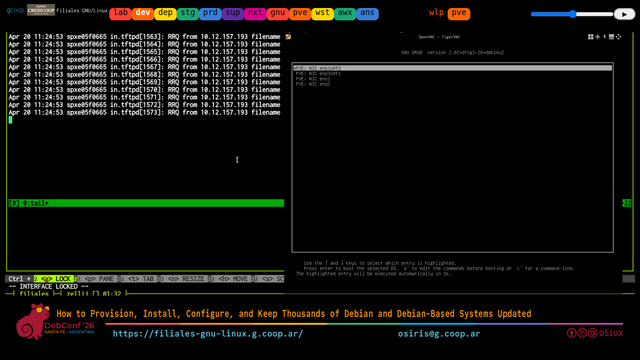
And immediately that will end *up* generating from one *Proxmox*, it will end *up* generating another *Proxmox*. Inside that *Proxmox* we have several *VMs*. One of those *VMs* is a *PXE* *Server*, I don\'t see anything here for it, but it must be this one.
```{=org}
#+ATTR_HTML: :width 640 :height 360 :title presentation with debug, PXE boot and unattended installation of debian netinstall
```
[](file:img/debconf26/debconf26-filiales-gnu-linux-03-dev-net.png)
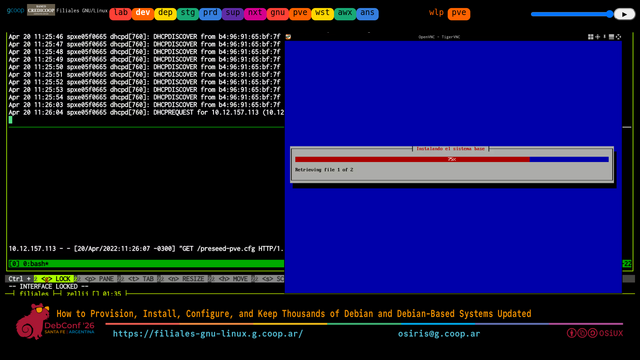
We have a server, well we have a *CDN*, which is a processing server, an *Nginx* that has all the resources, which in turn acts as a *Proxy* for another, which is an *Apache*, and a server that replicates this data. Well, this is done automatically and unattended, without operator intervention. That means a server comes straight out of the factory,
you open the box, install *power*, install *network*, and from *AWX* a *script* is launched. This is the *AWX* infrastructure, sorry, the *Proxmox* one, we were going to see, here it shows how it launches, and this is just for monitoring, let\'s say, everything is done unattended and the operator doesn\'t need to see anything running. The *AWX*
*deploys* the *Proxmox* via *PXE*, actually there are several stages; first it *deploys* a *Debian* *NetInstall* completely unattended, meaning you don\'t have to touch anything, directly in *OEM* mode, it configures everything necessary for that server to be operational. When it finishes, in a hook, at the end of the *Debian* *NetInstaller*, we
made a *script* that does this: it takes the `MAC` address of that machine, which is unique, and registers it in the *AWX* *Inventory*.
So that machine, which just received a random *IP*, we already know what its *IP* will be, what its *iDRAC* is, it permanently stays, for all the years that *Server* will last, referenced to that `MAC` address and to a serial number that the server\'s own *iDRAC* has. So, in that way, it is easy to identify it.
Over there on the left, the only thing there is the *debug* output of what is being seen on the *PXE* *Server*, and as you can see, the *Server* is at the *PXE* *Server*, the *Server* installs itself, there is no manual intervention and it finishes installed; it\'s a *Debian* system.
The next *playbook* that is launched to *AWX* converts that *Debian* into a *Proxmox*, also in an unattended manner. That is, we do not install *Proxmox*; we install *Debian* and convert it into *Proxmox*. That is an advantage of *Proxmox* being a distribution based on *Debian*: the only thing that changes is adding a *repo*. And done, all necessary
packages are configured.
And when it finishes configuring inside a *Proxmox*, we launch another *playbook* that creates the *VMs*, and yet another *playbook* that creates the services inside each *VM*. All the *VMs* we use are *KVM*. This is a Bank; it needs greater robustness in Security, so all machines are `up-to-date`. Over there on the left you can see the
creation of all the different *VMs*. There are `10` *VMs* per *Server* and, rounding more or less, about `300` physical servers. That gives us a total of `3,000` *Debian* systems. Installed automatically across the entire country.
## Workstations
```{=org}
#+ATTR_HTML: :width 640 :height 360 :title presentation of the execution of a playbook from AWX to a virtual Workstation in a Development VM within Proxmox
```
[](file:img/debconf26/debconf26-filiales-gnu-linux-03-dev-wlp.png)
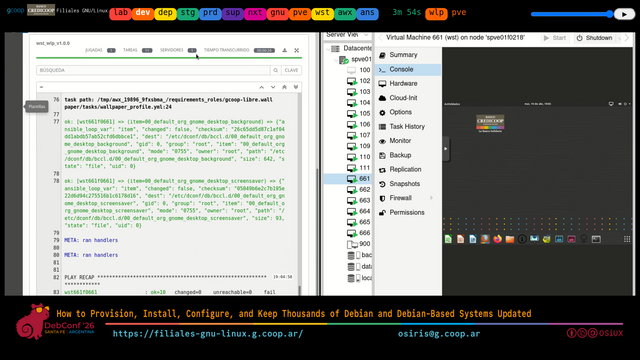
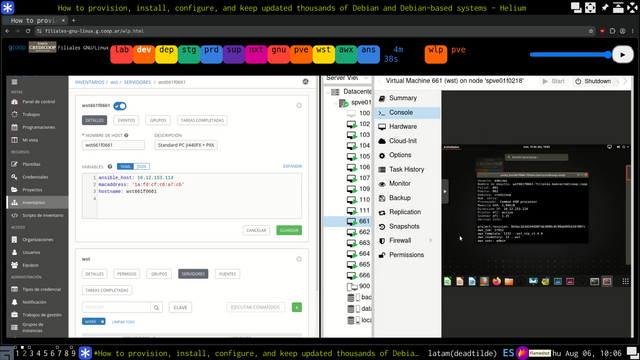
For workstations we made an image. There we are looking at a test virtual workstation from Development inside a *Proxmox*. And what we do is generate a base image, also a *NetInstall* in this case based on a distro based on *Debian*. And then we configure it, also in the same way, with a *script*. it takes the *hostname* of the machine, which can be
configured later or reconfigured at the destination site. It is registered in the *Inventory* and remains available also with a manufacturer *serial number*. They are all *HP* *Workstations*. We can identify them uniquely, even if the `MAC` address changes at some point. It\'s always the same device.
```{=org}
#+ATTR_HTML: :width 640 :height 360 :title presentation of the AWX inventory where you see the connection variables of a workstation and at the same time the host information is displayed within the virtual workstation desktop in a development VM within Proxmox
```
[](file:img/debconf26/debconf26-filiales-gnu-linux-03-dev-wst.png)
The graphical interface of *AWX* is basically a *Web* page written in *Django*. And there are lots of operators working by launching different *playbooks* we made, so that this stays operational. And the *PXE* server also takes workstation images. That is, you can take a workstation on-site; if it got misconfigured, something happened to it,
doesn\'t work, it doesn\'t matter. The entire workstation image is rebuilt via *PXE*. No time is wasted waiting to see what\'s wrong with it. You don\'t access the machine manually. it is rebuilt from scratch. Why? Because there are no local data within the workstation. The data is on a *Kerberized* *NFS* *Server* within the same network as the
*branch* where we are.
```{=org}
#+ATTR_HTML: :width 640 :height 360 :title presentation of the deployment of several workstations using GitLab, AWX and showing the authentication flow between workstations and FreeIPA integrated into ActiveDirectory cluster
```
[](file:img/debconf26/debconf26-filiales-gnu-linux-04-dep-wst.png)
## Scaling *Ansible* and *AWX* to 6,300 Debian/Debian-Based Systems
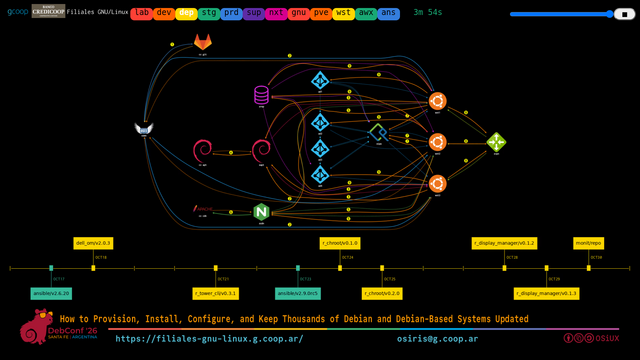
Well, and similar to the *Proxmox*, we have the workstations.
For the *deploy* at the *branch*, it\'s a bit more complex because the deploy of the *branch*, as we said, we have `3,000` workstations. Of these `3,000` workstations there are no users on the workstations. That is, in those workstations, if you look at `/etc/passwd`, there are no local users, aside from the ones
already in the system.
What we use is a *FreeIPA* client that connects to *IPA* and from *IPA* it connects to the `4` *ADs* we have. And they pull those domain users on the fly directly. And for this reason each workstation has to be enrolled in the domain as well. But what is done is that they enroll in the *FreeIPA* domain. And *FreeIPA* connects to the
*FreeIPA* domain. And *FreeIPA* has a trust relationship with the *ActiveDirectory* domain. I mean, it\'s like a subdomain. And what it allows is that for all those `users`, their *password* stays in the *AD*, which is the Bank\'s infrastructure, without having changed anything for them. For them it is transparent. And from all
`GNU/Linux` machines they use the same `user` directly. What is in the middle and enables this is called *FreeIPA*.
And to speed *up* the deployment process what we have new is multiple layers of caching. We have several *proxies*. Initially we had *Debian\'s* `apt-cacher`. Now there are also some *Debian* mirrors. And then we have `nginx` for proxying and `squid` for caching. To make this work across the length and breadth of the
entire country.
## Hardware Diversity in the Branches
```{=org}
#+ATTR_HTML: :width 640 :height 360 :title presentation with the total quantities of hardware, 3000 HP ProDesk 400 G5 workstations, 300 Dell PowerEdge R340 servers and 3000 virtual Debian/KVM in Proxmox
```
[](file:img/debconf26/debconf26-filiales-gnu-linux-05-stg-hwd.png)
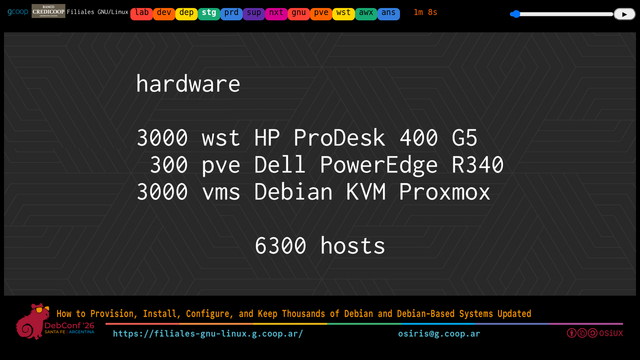
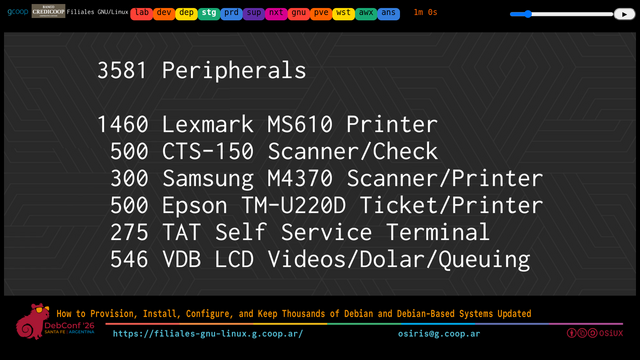
Here is a bit of the hardware *IT* started with. `3,000` *HP* *ProDesk*. `3,000` *Dell* servers. Sorry, `300` *Dell* servers. `3,000` virtual *Debian*. Afterwards *IT* changed a little bit. But also later we found `3,500` different peripherals. Strange things like a *check* *scanner* or a ticket
printer.
```{=org}
#+ATTR_HTML: :width 640 :height 360 :title presentation with the total quantities of i3581 peripherals, printers, scanners, ticket printers, self service terminals, etc
```
[](file:img/debconf26/debconf26-filiales-gnu-linux-05-stg-prn.png)
## Project Initial Stack
```{=org}
#+ATTR_HTML: :width 640 :height 360 :title Presentation with the technology stack: Ansible v2.9, AWX v9.3, Debian 10.9, Proxmox v6.3, FreeIPA v4.6 and Ubuntu 18.04
```
[](file:img/debconf26/debconf26-filiales-gnu-linux-05-stg-ver.png)
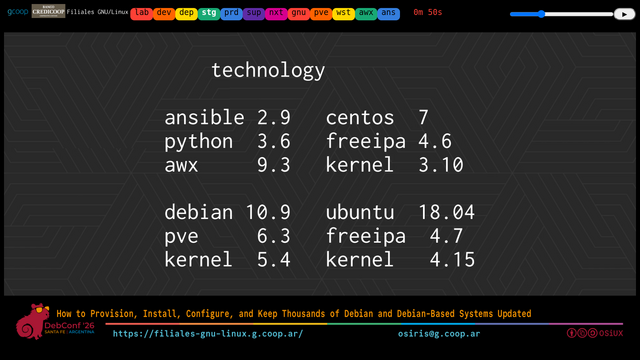
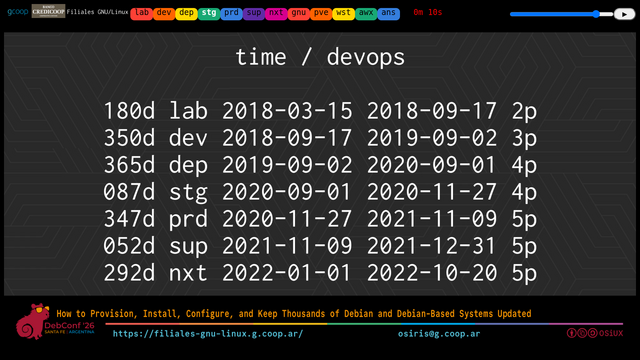
This is what the infrastructure originally was with which the project started in `2018`. It kept varying. We also changed some *VMs*.
```{=org}
#+ATTR_HTML: :width 640 :height 360 :title Presentation with the staff at each stage: laboratory (2), development (3), deploy (4), staging (4), production (5), support (5), next (5)
```
[](file:img/debconf26/debconf26-filiales-gnu-linux-05-stg-ops.png)
## Released *Ansible* *playbook* and *role* repositories!
```{=org}
#+ATTR_HTML: :width 640 :height 360 :title Presentation with a list of git repositories of Ansible utilities, roles and playbooks released at https://gitlab.com/gcoop-libre and https://github.com/gcoop-libre
```
[](file:img/debconf26/debconf26-filiales-gnu-linux-05-stg-git.png)
## Plotting domain logins and FreeIPA cache synchronization
```{=org}
#+ATTR_HTML: :width 640 :height 360 :title Presentation with FreeIPA domain login tracing and cache synchronization using ipa-sss-syn script
```
[](file:img/debconf26/debconf26-filiales-gnu-linux-06-sup-ipa.png)
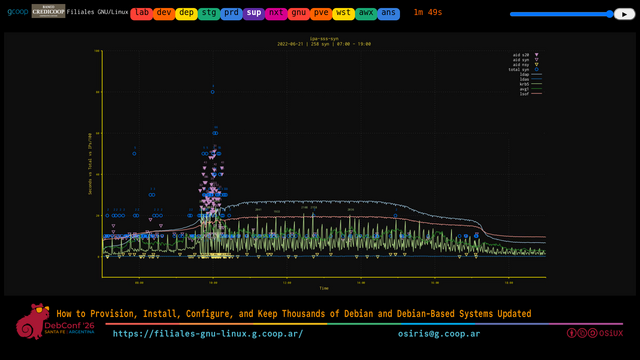
And quickly what we encountered were problems. Scale problems. This is a graph of *login* attempts during the day. And what you will see is that there is a little problem here at `10` in the morning. That is, `3,000` people wanted to *log* in at `10` in the morning. It looks the same when they go down later starting
from `4` *PM*. The logins start going back *up*. And well, here there is a delay/caching problem. And other problems which is, imagine with `3,000` users, with the robust security policies of a Bank, every day many *passwords* expire and they have to be changed and all that. And that change has to be done from our distro\'s
*login* screen. That is, directly from there. It tells them the *password* expired and at that moment it asks for the old one, twice for the new one. Someone in the early morning gets confused. That generates another *password* *issue*. But about this... Now I will tell you what was worked on to improve it.
## Automating the implementation of *AWX* resources with *GitLab* `CI/CD` and *Ansible* *Tools*
```{=org}
#+ATTR_HTML: :width 640 :height 360 :title Introducing Automating AWX Resource Deployment with GitLab CI/CD and Ansible Tools
```
[](file:img/debconf26/debconf26-filiales-gnu-linux-07-nxt-awx.png)
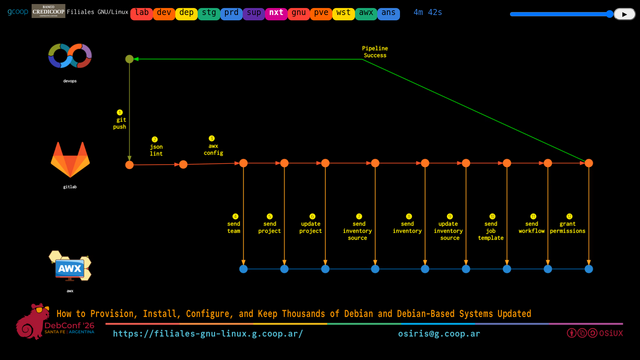
And so, to do that too, well, part of the automation we achieved is, instead of going to *AWX*, which is a graphical interface, and clicking to create *playbooks*, to create *workflows*, to create inventories, and giving permissions and all that manually, what we did is a *Git* *repo* called *AWX*, a *repo* called *Inventory*, and they are all
*JSON* or *YAML* files, which *GitLab\'s* *CI* directly verifies and *deploys* into a Development *AWX* immediately as we do the *Git* *push*. So in this way we can have all stages verified and automatically deployed in a Development *AWX* for *Testing*. In the Production *AWX*, this *deploy* is triggered manually, let\'s say, but it creates the
same instances. That guarantees us versioned infrastructure as code.
## Global view of centrally managed hosts from *AWX*
```{=org}
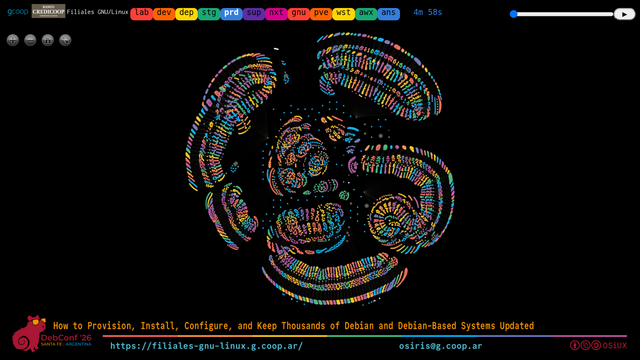
#+ATTR_HTML: :width 640 :height 360 :title graph with global view of all centrally managed hosts from AWX
```
[](https://filiales-gnu-linux.g.coop.ar/prd.html)
And to give you an idea of the project\'s scale, this is a view of what the Bank\'s productive infrastructure is. I said, it\'s about `300` Branches distributed across almost all provinces of the country. And now, if we look closely at this, we will understand a little more; these are all *hosts*. And all these *hosts* are controlled by
one over here, which I am going to find right now, there. This one here is *AWX*, it\'s a single *VM*, not even on physical hardware, that controls all the others and *deploys* to all of them. Obviously they don\'t *deploy* them all together, they *deploy* them in stages.
```{=org}
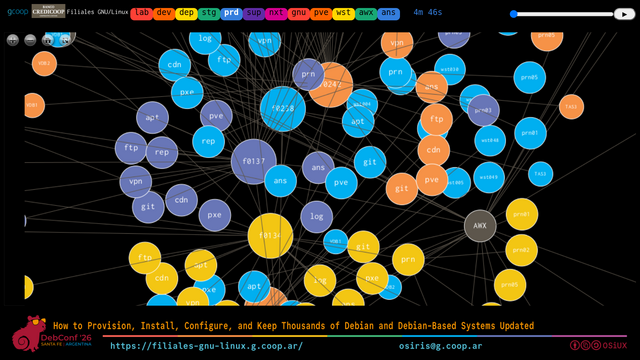
#+ATTR_HTML: :width 640 :height 360 :title zoom a portion of the graph with global view of all centrally managed hosts from AWX
```
[](file:img/debconf26/debconf26-filiales-gnu-linux-08-prd-awx.png)
And what we have is that each line, for example here, let\'s see, this is the province of... the province of Santa Fe. And I will try to highlight a little. All of this are the machines from all the different Branches of the entire province of Santa Fe. And if we zoom in on one, here, for example, it is `f0372`. And well, within the
concept of that *branch*, we have a local caché, which is a *CDN*, the `PVE`, which is the *Proxmox* *Server*, the `REP`, which is the *file* *Server*, a Kerberized *NFS*, a *log* machine, which receives the *logs* from all the others and forwards them. Initially we did this with rsyslog. There is a `VPN` node that
we do not intervene on, but we made the automatic installation, which basically that is configured `BY` the Bank\'s personnel. We have an Apt-Catcher, there, local, within the *branch*. What else do we have? Well, this *Git* one, in the end we ditched it. The print *Server*, which is a `CUPS`, where all the place\'s printers
are configured. And then, here is the representation of the different printers from that *branch*. And then we will have the different *Workstations*. And finally the rest of the equipment there. Ticket printers and so on.
And this infrastructure, this infrastructure repeats throughout the Bank. So that if you don\'t do this automatically, it is impossible to maintain.
And what we achieved with this is that this *AWX* infrastructure allows us that we no longer need to *log* into a machine manually and see what happens. There is an *AWX* *playbook*, from the Headquarters, where there is already a *template* to solve each problem. And you run that *template* and it leaves a *Record* of everything that happens, a
traceable *log*. Obviously there are different permission levels. Who can do that? Who cannot? Schedules, for example. I don\'t know, if we want all machines to shut down at a certain time, well, there is a *template* that sets a `poweroff` at a certain schedule on each machine. For example, and you launch it. You can do things like
`SNMP` sweeps to know if certain machines are alive or dead. That is, all of that ends *up* in one, finally a *PostgreSQL* database, managed from *AWX*.
## Global view of the role and playbook catalog in AWX
```{=org}
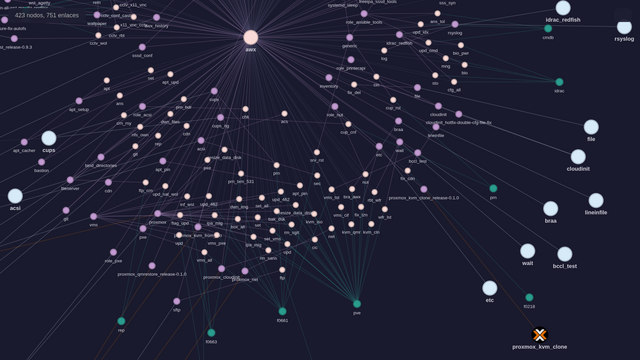
#+ATTR_HTML: :width 640 :height 360 :title graph with global view of all playbooks and roles in the AWX catalog
```
[](https://filiales-gnu-linux.g.coop.ar/ans.html)
And if we wanted to see a little of what it is, this is, like a view of all the *playbooks* that are in *AWX*. Here is our *AWX*. Here I tried to organize them a bit. Here we have *iDRAC* *Redfish*, `rsyslog`, *CDN*. Well, here we have the *Inventory*. I don\'t know if you can see anything there. You can\'t see it there. Neither do I see
it here either. But, let\'s see, let\'s look here. Here, for example, we have a role that clones a *KVM* *VM* in *Proxmox* So there is just a role for that. Over here we will see more. This role creates a *KVM* *VM* from *Proxmox* directly from an `ISO`. And it is an `ISO` that is already unattended. That is, you don\'t have to
do anything. That is for the `VPN`. A *Proxmox* role to configure `cloud-init` for each of the *VMs* We use the *OpenStack* image Let\'s say cloud, but without cloud, local, to do a `qm restore` That is, we can *restore* a *VM* from a *backup* and it comes *up* running. And so, there is a *playbook* for everything.
## Recent Updates, Security, and Migration to *OpenShift*
Well, this is more or less what the migration *project* was. I will try to summarize, and move forward with what\'s new. A little difference from this of `2022` to `2026` in what has been worked on.
Well, there are over `200` *Git* repos to control all of this. Now what is being done, part of what was actually done, we worked a lot on cybersecurity. We changed from `rsyslog` to `auditd`. We integrated `NUT` for the `UPS`, to have `UPS` monitoring. We are working on updating the
*Debian* from those *VMs* from `10` to `13`. This, remember, started in `2018`.
*FreeIPA* automation, now a new was done... that is, what we currently had in production was only one large *FreeIPA* *VM*. And since the Bank has *OpenShift*, we are doing a migration of *FreeIPA* to *OpenShift*. Also all with automated *playbooks*.
Here as a summary of everything done in *Cybersecurity*. It is a role that connects to each machine and says what is right, what is wrong. Some things it can correct and others simply say this cannot go to production like this.
We also worked on the topic of *Kernel* booting so that some *Server* models would appear and to identify the network cards and for everything to work automatically and disk repartitioning and so on, there are different *Server* levels. The regeneration of all these images. Everything that would be the lifecycle of the *VMs* that have to be
registered. Several that were taken down. Others that changed that didn\'t need a secondary disk somewhere. The order in which they start. A report of what the status of all this is. All those *VMs* and updates. Well, there\'s a little of what I said about *Server* versions.
## Workstation Challenges, Browsers, and User Restrictions
And we will advance because we are short on time.
For *Workstation* is what has been worked on the most because it had originally been worked on with a *Workstation* `18.04` and now we moved to `24.04` if I\'m not mistaken. And then besides there are some problems they had. Remember this original infrastructure was not *GNU* and worked with *Firefox* `v9`. We took
it to `v68` and now we took it to `v120` and *tests* are being done with `v140`. The problem is not so much the environment, but the problem is the ecosystem of all the internal applications that are not updated and don\'t work. Basically it\'s not an easy *task*. So for a moment more than one versión of browser
coexisted. Uh... And that was another challenge.
And well, also *issues* of updating the *Kernel* version. We had to *patch* some difficult *CVEs* that came out recently. Well, at some point *Chrome* was also tried as an alternative for some sites.
We do with a *playbook* all the configuration policies of *Firefox*. The `user` basically cannot do anything. That is like... They can\'t even change the wallpaper. Well it\'s the way to keep `3,000` users. Well then... No one goes into a machine to configure it. From *AWX* a *playbook* is launched directly.
And, uh... Well the topic of *WakeOnLAN*, integration, updating the *Kernel*, `sftp` fixes. That is well everything that would lead to the new versión of *IPA*. We worked quite a bit with *AppArmor* to restrict... Uh... Some important things. The handling of *login*. Also handling being able to change the *password*. Uh... Well *Backup*
and all that.
And, uh... Let\'s see... A little of *AWX* here. Uh... Well there are `198` *releases* since we finished migrating it. Because as with any large infrastructure when you finish migrating it you have to start migrating again. Basically. It is in constant change. And well all the time after that new needs also come out...
Uh... Well we have *CloneZilla* for this I said of booting a machine with an already built image. Uh... And solving problems. Uh... Here uh isolated profiles. Isolated from each other due to configuration *issues*.
## *CCTV*
A part of *CCTV* was added. Machines that are integrated into the security cameras\' *DVRs*. Uh... So well that is like a new inventory being added.
## *HP Linux Tools* [^13]
Uh... *HP* *Linux* *Tools*, for example that... A detail is at one point uh a machine froze and froze in strange situations. We took long to investigate what happened. It had to do with a *power* saving configuration of the *BIOS*. And so the solution was simple. It was to go into `3,000` machines, change the *BIOS* configuration and
`reboot` them. It\'s done. It\'s very simple. Do you need `3,000` technicians or uh as many as Branches in the entire country? /It is impossible. And well there uh I set out to investigate *HP\'s* *FTP*. And found a crazy guy on *Linux* who had a tool that allows writing a *file* in the *UEFI*. With the *BIOS* configuration
that it will take the next `reboot`. This requires compiling a *Kernel* module and so on. Uh... we told them to ask permission to *HP* and guarantee they weren\'t going to turn into a *BIOS* that turns `3,000` bricks. They said Yes! And well we did several *tests*. Never happened to us. So they worked out fine. Uh... And that
allows well again centralized administration you could even change the *password* of the *BIOS* of all machines centrally and remotely. So it\'s super useful.
Uh... Well here for example this modification of the *Git* *tokens* and... There are a lot of things.
## Slides on the web/
This... At the URL down below, [](https://filiales-gnu-linux.g.coop.ar) all of this will be available. So if you want to see it in detail.
## Closing
Uh... And since there are five minutes left uh if it\'s okay I\'ll close here and ask anything you want... Because we won\'t manage to see everything.
## Question 1 ActiveDirectory/
*Audience*: Hi. Uh... Are the *ActiveDirectory* you use *Windows* or do you also use *Windows* *Server*?
*OSiUX*: Yes it\'s Bank infrastructure. Uh... That already existed and they weren\'t going to change it. The challenge was that all those users work on the new workstations. Uh... And it works.
## Question 2 `rsyslog` vs `auditd`
*Audience*: First of all impressive.
*OSiUX*: Thanks to the *Free* *Software* community! Uh... We put the pieces together.
*Audience*: You really squeezed every bit out of *Ansible*, but I didn\'t think that much could really be done. I had a particular small doubt about something I saw. You said you changed from `rsyslog` to `auditd`
*OSiUX*: Yes. It was a *cybersecurity* request.
*Audience*: But the intention. Let\'s say `rsyslog` *logs* a level we call application maybe a system level. And `auditd` points a bit more to the *syscalls* of the system itself.
*OSiUX*: Yes, but it allows more detail. You can specify exactly what parts you want.
*Audience*: No no no. I understand. My doubt is, are you logging the *syscalls* of `3,000` clients?
*OSiUX*: That is... Not from all workstations. Actually it\'s uh... Generally from the VMs mostly and some things. It is selective, not everything.
*Audience*: Ah ah.
*OSiUX*: No, because otherwise there\'s no way.
*Audience*: No no it\'s fine. That was it.
*OSiUX*: Exactly, it\'s to not send all the logs. That is, to send selectively. All this information goes to a *SIEM* that is at Headquarters.
*Audience*: Just one?
*OSiUX*: Yes, well it could be more than one node.
*Audience*: Ah no.
*OSiUX*: But let\'s say conceptually it goes to a *SIEM* where everything that happens is visualized there. And also to the *SIEM* goes all... the log of the *AWX* deploy. So also...
*Audience*: Like *SIEM*?
*OSiUX*: No, another I don\'t remember now but it is known. Now if I tell you I\'d lie. (it was *Splunk* that was the *SIEM*)
*Audience*: Thank you very much.
## Question 3 Wins, Pivots, and Next Steps
*Audience*: I agree with the colleague, hard work, a tough *Job*. And moreover done with Free *Software*. My question is basically based on the experience of the whole *project*. What went really well? What are you going to start doing apart from what you mentioned? And what things went one way and you said no this doesn\'t go this way we pivot?
*OSiUX*: The biggest challenge in general is not technical itself, but it\'s dealing with the priorities of everything that needs to be done. And with things at `user` level for many free applications are not designed for such a large scale. And a problem where you want `users` to not be able to touch anything. For example,
there are *PDFs* that are like *smartforms* you can fill out. And then you have to print them. And that was really complex to solve. At the beginning we had to install *Adobe* *Acrobat* with I don\'t know `wine` or some horrible thing because it was the only one that supported it. `evince` showed them but didn\'t allow us to
complete. After we had an option I don\'t remember which allowed us to complete. But it didn\'t let you hide the comment in each form, in each textbox. And that came out printed and didn\'t work. Now we worked on `okular` which has all that. But doesn\'t have any `file-by-file` configuration option to disable everything. That
is, the `user` can deactivate it in the moment. Well then we worked. We are touching Okular\'s code so that works. The same happened with some binaries that don\'t have translation and don\'t have translation *Support*. And well what we could we edited with a hex editor and deployed our binary. Things like that, let\'s say with apologies
to Asians we call them Chinese. (\"Sorry, I will avoid this type of comment in the future\"). That is, there are things sometimes you have to get `hands-on` and solve it. Or complex *Bugs* where I don\'t know you enter a screen and for X reasons if you move the mouse a little further down to the right `gnome` freezes. And then
you have to put a *script* that prevents you from going down. And also things that a user *owner* of their environment doesn\'t have a problem with because they can customize. And an end `user` cannot touch anything. And you as *Admin* of this infrastructure also don\'t want them to touch but you have to give them a solution. Like
thousands of things. What we didn\'t get involved in and delegated was the *check* *scanner* integration part. I tried for a while and couldn\'t get it. That was outsourced. But it works. We did manage to get the ticket printer to work well. And that implied a challenge that the banking *core* at that time used some *Java* applets. And that nothing
was impossible. We had to *PUT* a chroot in the middle with something old for that to work. Well in the end we could avoid all that. Because now that *core* already detects when it\'s `GNU/Linux` and done, it throws code and we *PUT* a local *Backend* that does everything missing and it works out. But yes it\'s a challenge of many people.
I am currently not on the *project*. I was in the initial development and migration *Stage*. There are three people now who are *full* time on this. And every day something new appears.
*Audience*: Well excellent.
*OSiUX*: I can stay here and chat.
## Question 4 management and composition of the human team in `GNU/Linux` Branches/
*Audience*: Well. *OSiRiS*, first thank you. For those of us who came here to learn. The admiration you generate with everything you tell. My question doesn\'t go by...
*OSiUX*: It\'s *gcoop* work too, not mine... I\'m just selling it.
*Audience*: Of everyone. My question goes more. Goes more that way. Not the technical side. But by the team or human group. That exists in Branches `GNU/Linux` which if I understand is the organization behind this whole project. How many people are needed to do this? And how do you manage it?
*OSiUX*: Well initially it was a six month project. Of two people. A functional analyst and me. To see if the project was viable. Afterwards started. I think we started three people. At the peak we reached three people? Five?
*gcoop*: Three plus one.
*OSiUX*: Yes sure. Always with a *PM*. But at the peak five no. I mean I think there... I don\'t count the *PM* poor. Because he always talks about we are not people. That we are *developers*. That we are weird things. So well it\'s revenge. No at the peak five people. Today there are three. Of *DevOps*, let\'s say. But that have to. Let\'s say is
the FullStack. So to speak. But then you have to touch or redesign an application. I mean we had to design applications to fix existing things. I mean it\'s the fun and complex at the same time.
*Audience*: I thought you were going to say three hundred, I don\'t know. Thank you very much.
*OSiUX*: No no, sorry. We designed the automation of all this. The Bank has its own arsenal. An army of people who use all this daily. They did the migration in full pandemic `2020`. In less than a year! But it was a physical army of people that solved all that. *AWX* operators I think they are more or less like sixty. That is like...
Well there\'s so much people. The Bank\'s *Infra* is very big. And it\'s all *On-premise*. It\'s all local. That is and all with Free *Software*.
*Audience*: Thank you very much.
*Organization*: There, Alejandro. I\'ll put a question in the chat here. If later you can answer it there itself.
*OSiUX*: Yes. And later I have here colleagues who know how to speak English. And that if there is someone who doesn\'t speak Spanish.
*Organization*: Sure. And Alejandro will be around today. So you can keep asking him. Thank you very much.
*OSiUX*: OSiUX too!
## You might also like to read...
- \[How to Migrate 6300 Machines to GNU/Linux Using Ansible and AWX\](2022-10-20-como-migrar-6300-equipos-a-gnu-linux-usando-ansible-y-awx.md)
- \[Automating BIOS Configuration Using ansible and HP Linux Tools\](2021-12-30-automated-bios-configuration-using-ansible-and-hp-linux-tools.md)
- \[GNU/Linux Branches FLISoL CABA\](2022-04-23-filiales-gnu-linux-flisol-caba.md)
- \[Ansible Tools v0.3.0\](2022-10-03-ansible-tools-v0-3-0.md)
- \[Automating the Deployment of AWX Resources with GitLab CI/CD and Ansible Tools\](2022-10-08-automate-deployment-of-AWX-resources-with-GitLab-CI-CD-and-ansible-tools.md)
- \[Using Graphviz to Generate Slides\](2022-10-21-use-graphviz-for-slides.md)
- \[How to Make a Timeline with GraphViz\](2022-10-25-how-to-make-a-timeline-with-graphviz-using-timeline2dot.md)
- \[Administrador de Sistemas GNU/Linux\](linux-sysadmin.md)
## ChangeLog
- [`2026-08-14 14:42`](https://gitlab.com/osiux/osiux.gitlab.io/-/commit/81f8a9f95f549febba84f62d2299c0273cf5c57f) agregar *How to provision, install, configure and keep thousands of Debian and Debian-based systems updated*
[^1]:
[^2]:
[^3]:
[^4]:
[^5]:
[^6]:
[^7]:
[^8]:
[^9]:
[^10]:
[^11]:
[^12]:
[^13]: